


Game Radar - Freebie Tracker
0.00.00 Reviews
App Specs
- Version
- 3.0.0
- Updated On
- License
- Free
- Downloads
- 10,000+
- Developer
- T Code
- Categories
- Events
- Platform
- Android
Screenshots
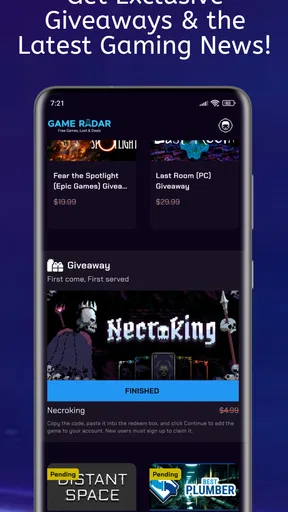
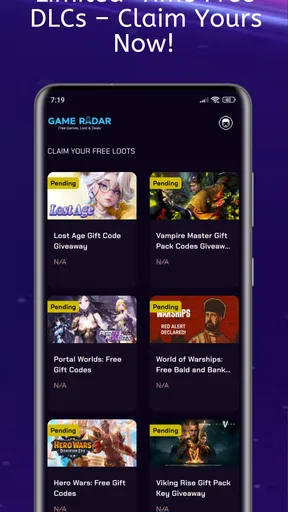
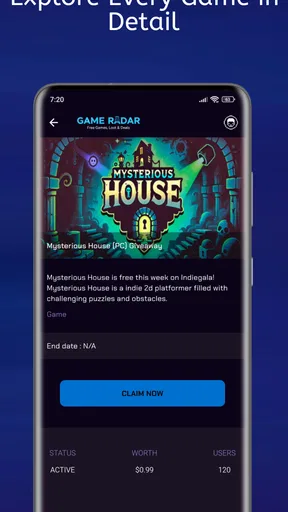
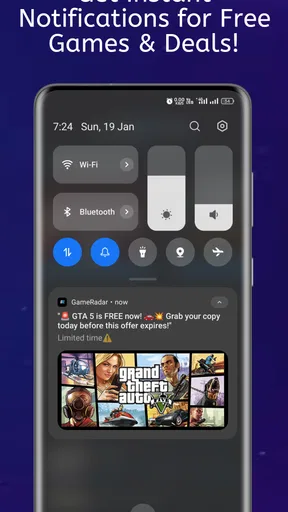
 Analysis by AppCompare
In a shared household, a free-game alert can be useful to more than one person, but it can also raise a practical question: whose account will actually claim the offer? I think Game Radar - Freebie Tracker works best as a discovery aid for spotting opportunities across gaming platforms, not as a shared account or family-management tool. That distinction matters when several people use the same device or have different accounts.
One household, several wish lists
Picture a parent checking their phone after dinner while one person in the family plays on a computer and another mostly uses a mobile device. A tracker that gathers free-game and discount leads can make it easier to notice something worth passing along, rather than relying on everyone to browse separate storefronts every day. The useful household habit is to treat an alert as a prompt to check the relevant store, then let the person who will play decide whether it suits them.
That handoff is important. A promotion being visible in a tracker does not mean it has been claimed, added to the right account, or made available on every platform. I would avoid tapping through on a shared device while signed into somebody else’s store account. First identify which platform the offer belongs to; then let the intended player claim it under their own account. It is a small routine, but it prevents a “freebie” from ending up in the wrong library.
Keep account boundaries clear
For a household that shares a phone or tablet, I’d use the app as a noticeboard rather than a place where everyone takes turns signing into storefront accounts. The tracker’s role is to help surface opportunities. Account credentials, purchase decisions, and final claims should stay with the person who owns the relevant account. This is especially sensible when younger players share a device with adults, or when several family members have different platform libraries.
Before acting on an offer, check the destination and the conditions on the platform itself. Free access can be tied to a particular service or account, and a discount is not the same thing as a no-cost game. I find that distinction worth making explicit around children: the app can help the family notice a deal, but an adult should still review what the offer involves before anyone claims or installs it.
There is also a useful low-friction workflow for shared use: one person scans for interesting items, sends the platform and game name to the person who wants it, and that player checks the current offer in the appropriate store. This avoids passing a device around or mixing up sign-ins. It also gives the recipient a chance to decide whether they want the game, rather than treating every alert as an automatic download.
Useful coordination, without assuming family controls
I would not choose a deal tracker expecting it to coordinate a household by itself. Its value is in bringing game, app, downloadable-content, and discount opportunities into view; the family still needs a simple way to share the ones that matter. A quick message with the platform and offer name is often enough. If people in the home use different platforms, include that detail so nobody wastes time looking for an offer in the wrong store.
Worth Reading Before You Choose

EA SPORTS FC Mobile 26 Is a Bigger Football Game, but It Takes Time

Flipboard Shows What News Apps Must Do Beyond the Feed

Switching to Android Auto Means Rethinking Your Driving Routine

Google Calendar Makes a Crowded Week Easier to Manage

Ludo King Makes the Most of the Minutes Between Plans

Baby Panda World Brings Quick Play to Modern Phones, but Its Game Library Feels Busy
A good practical rule is to separate discovery from decision-making. Whoever sees an alert can flag it, but the player should confirm that it fits their device, account, and interests before claiming it. That is more reliable than assuming a deal applies to everyone. It also helps avoid collecting games merely because they are free, which can leave a library full of things nobody intended to play.
For a child’s shared-device use, I’d keep the adult involved at the point of checking the store. The Everyone age classification makes the app broadly suitable from an age-label perspective, but it is not a substitute for a household’s own rules about accounts, downloads, or screen time. I would treat it as a practical discovery tool, not as a parental-control layer.
Discovering New Freebies
One of the coolest things about Game Radar - Freebie Tracker is how it keeps everything organized. You’re not just getting info on the latest free games; you’re also getting a curated list that’s easy to navigate. I was pleasantly surprised by how simple it was to dive into the app and find exactly what I was looking for. No more endless scrolling through forums or countless websites. Everything’s right here in the palm of your hand.
The app categorizes freebies by platform, which is a game-changer for someone like me who likes to dabble in a bit of everything. Whether you’re on Steam, PlayStation, or the App Store, you can filter out what doesn’t interest you and focus only on the games you can actually play. It’s streamlined and efficient, saving you time and effort.
Make the platform filter do the work
The most useful way to browse is to start with the devices and storefronts you actually use, rather than treating every listing as relevant. That keeps a mixed-platform feed from becoming another noisy catalogue. If you play on a computer but do not use a particular mobile store, for example, filtering your view around your real setup makes it easier to spot offers you could act on.
There is a trade-off to that approach: a strict filter can hide something you might want to give to a friend or try later on a different device. I’d widen the view occasionally when I’m looking for a gift idea or checking what’s happening across platforms, then return to my usual selection for everyday browsing. In practice, that makes the feed useful without turning every session into a survey of offers I cannot use.
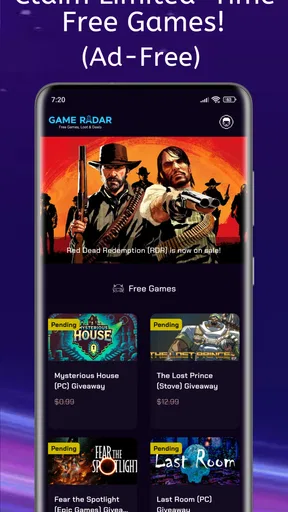
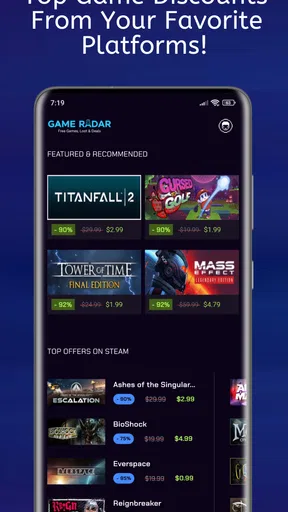
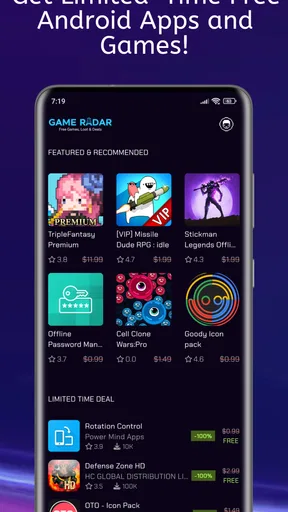
Game Radar is an Events app from T Code, and that framing suits its strongest purpose: keeping an eye on changing offers rather than replacing a game store. Its store summary points to free games, apps, downloadable content, and discounts associated with Steam, Epic, and the Play Store. I’d use it to discover a lead, then open the relevant storefront to inspect the offer and make the claim there. A tracker can save the search; it cannot make every listing relevant to every player.
Notifications That Matter
Let’s talk about notifications. We’ve all been there—overwhelmed by a barrage of pings and buzzes from apps. But with this app, it’s different. The notifications are customizable, so you only get updates that you truly care about. Want to know immediately when a new game is up for grabs on Epic Games? No problem. Prefer to check in once a day? That’s cool too. It’s all about giving you control over your freebie hunting experience.
I found this feature particularly useful. There were no more missed opportunities because I didn’t check a website in time. Instead, the app kept me in the loop without being intrusive. Honestly, it feels like having a personal assistant dedicated to hunting down free games for you.
Use alerts as prompts, not automatic decisions
Even when notifications are helpful, I would not let them decide what deserves my attention. A good setup is to keep alerts focused on the platforms or kinds of offers I genuinely use, then review the details before acting. That reduces the chance of treating every notification as urgent. When an offer is for a game I already own, a platform I do not use, or content that does not interest me, I can simply move on.
For a busy household, alerts can also be a conversation starter rather than a reason to interrupt someone immediately. I might save the game name and mention it later to the person who plays on that platform. This is more considerate than sending every ping to everyone, and it avoids creating the impression that a time-sensitive deal must be claimed without checking the terms first.
There is a broader trade-off here: prompt alerts can help catch limited-time opportunities, while checking manually gives you more control over when gaming deals enter your day. I’d start with the least distracting notification setup that still fits my habits, then adjust it if I keep missing offers I actually care about. The best arrangement is personal; a household with one shared gamer has different needs from one where several people follow separate platforms.
User Interface and Experience
The user interface is sleek and intuitive. Even if you’re not tech-savvy, navigating through the app is a breeze. The design is minimalistic yet effective, focusing on functionality without compromising aesthetics. As someone who appreciates a well-designed app, I found myself quite satisfied with how everything was laid out.
What’s more, the app doesn’t bombard you with ads, a massive plus in my book. You can explore and enjoy hunting for games without interruptions, allowing for a seamless experience. That’s something I really value in an app, and it delivers on that front.
Where it fits among deal-hunting options
The familiar alternative is to check each storefront directly. That gives you the store’s own offer details at the point of claim, but it means visiting several places and remembering to look. Another option is to follow gaming forums or deal communities, where discussion can add context but also requires sorting through posts and chatter. A focused tracker sits between those habits: it can make discovery more convenient, while the storefront remains the place to verify and act.
I would not replace a store’s own pages with a tracker when I need to know whether an offer is still active, whether it applies to my account, or what exactly is included. Nor would I rely on any single feed as a complete record of every deal across every service. For someone who checks one store occasionally, going straight there may be simpler. For someone who bounces between platforms and forgets to look, a central place to scan can be the better fit.
The app is free, has an Everyone age rating, and is listed for devices running Android 5.0 or later. It was released on January 5, 2025, and its current version is 3.0.0. It has over 10,000 installs, while its average rating is 0.0, so I would not use ratings alone to judge whether it suits my routine. I’d try it for the convenience of tracking offers, then decide based on whether its feed and alerts save me effort in real use.
Community and Support
Another aspect worth mentioning is the sense of community. The app developers have created a space where users can engage and share tips about upcoming deals. It’s like being part of a club where everyone’s keen to help each other out. The support system is responsive too, which is always a good sign. Whenever I had questions or encountered a bug, the support team was quick to respond and eager to help.
Who will get the most from it
I’d recommend this kind of tracker to people who play across more than one supported storefront, enjoy trying games they might otherwise overlook, or want a regular nudge to check for offers. It can be especially handy for a household where different players follow different platforms: one person can spot a possibility and pass along the relevant name, while each player keeps their own account and decides what to claim.
It is less compelling if you only use one store and already check its offers regularly, or if you want a tool that automatically manages family libraries and permissions. It is also not the right answer for someone who expects an alert to guarantee a deal remains available. I would confirm any offer directly before planning around it. That extra check is a sensible habit with deal discovery, whether the lead comes from an app, a forum, or a friend.
Final Thoughts
In conclusion, Game Radar - Freebie Tracker is a fantastic app for anyone who loves gaming and hates spending more than they need to. It’s user-friendly, efficient, and, most importantly, effective in helping you track down the best freebie deals out there. If you’re looking to expand your game library without breaking the bank, this app is definitely worth a try.
Whether you’re a seasoned gamer or just getting started, having this app in your arsenal is a smart move. So, go ahead and give it a whirl. Who knows what epic games you might stumble upon for free?
A sensible household verdict
My recommendation comes with one clear boundary: use it to notice opportunities, not to blur account ownership or skip checking the actual store. In a home with shared devices, that keeps the process straightforward and lets each person choose what belongs in their own library. For solo players, the same principle prevents clutter from offers that look appealing only because they cost nothing.
Overall, I see it as a convenient companion for curious deal hunters, especially those who switch between platforms and want a lighter alternative to manually checking every source. If you prefer a single storefront, need family account controls, or would rather avoid notifications altogether, your existing store routine may suit you better. For everyone else, it offers a practical way to keep free and discounted gaming opportunities on the radar while leaving the final decision where it belongs: with the player.
Pros
- Easy-to-navigate interface.
- Real-time notifications for deals.
- Covers multiple gaming platforms.
- Personalized deal recommendations.
- Regularly updated with new offers.
Cons
- Occasional notification delays.
- Limited customization options.
- Ads can be intrusive at times.
- Requires internet for full functionality.
- Some deals are region-specific.
FAQs for Game Radar - Freebie Tracker
What is Game Radar - Freebie Tracker and how does it work?
Game Radar - Freebie Tracker is an app designed to help gamers stay updated on the latest free game offers across various platforms. By aggregating data from numerous sources, it delivers timely notifications about free games and discounts. Users can customize alerts based on their preferences, ensuring they never miss out on a great deal.
Is Game Radar - Freebie Tracker free to use?
Yes, Game Radar - Freebie Tracker is free to download and use. While the core functionalities, including tracking and notifications, are available at no cost, there may be optional in-app purchases or ads. These can enhance the user experience by offering additional features or removing ads.
Which platforms does Game Radar - Freebie Tracker support?
Game Radar - Freebie Tracker supports a wide range of gaming platforms, including but not limited to PC, PlayStation, Xbox, and Nintendo. The app is designed to cater to diverse gaming preferences, ensuring users receive updates relevant to their chosen platforms.
How accurate and timely are the notifications provided by the app?
The app is known for its accuracy and timeliness, relying on real-time data aggregation to deliver instant updates. However, the speed of notifications might depend on the user’s internet connection and device settings. Users are advised to enable push notifications for the best experience.
Can I customize the alerts I receive from Game Radar - Freebie Tracker?
Absolutely! Game Radar - Freebie Tracker allows users to customize their notification settings extensively. You can choose specific game genres, platforms, or set preferences for certain types of deals. This customization ensures that users only receive alerts that are relevant to their interests, reducing unwanted notifications.


